
本教程基于TQ2440开发板来介绍嵌入式Linux的相关内容。
1. 开发板总览图
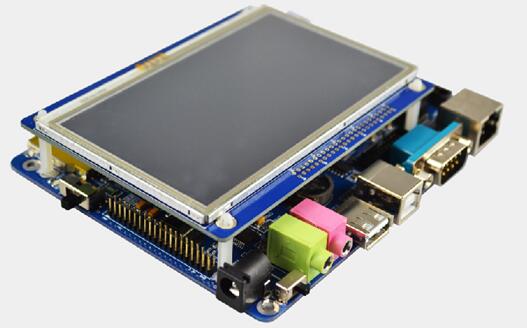
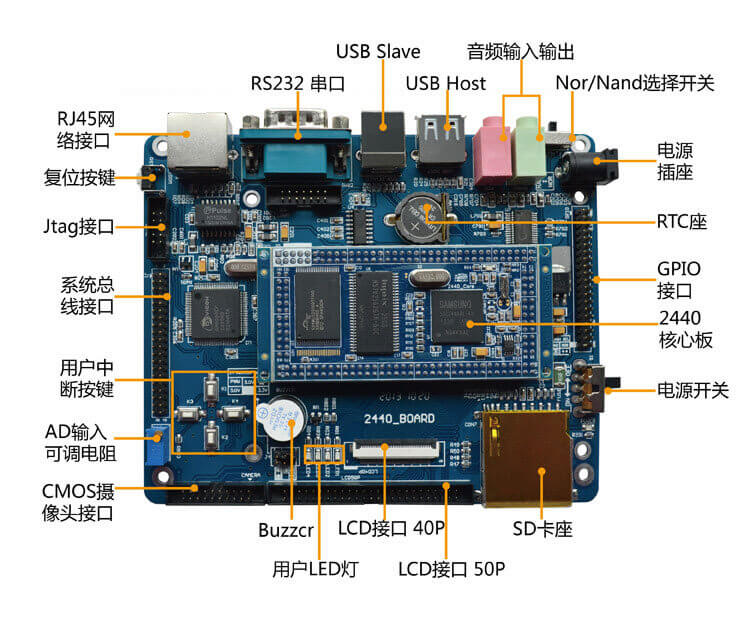
1.1 TQ2440核心板参数
| 特性 | 说明 |
|---|---|
| CPU处理器 | Samsung S3C2440AL,主频400MHz(最高可达533MHz) |
| SDRAM内存 | 板载64MB SDRAM |
| Nand Flash | 板载256MB Nand Flash(标准配置),掉电非易失 |
| Nor Flash | 板载2MB Nor Flash |
| CorePower | 专业1.25V核心电压供电,完美解决CPU发热现象 |
| Power | 核心板采用3.3V供电 |
| Powerled | 1个核心板电源指示灯 |
| 核心板接口 | 接口型号为DC-2.0双列直插 |
| 尺寸 | 37mm x 74mm |
1.2 TQ2440底板硬件参数
| 硬件特性 | 说明 |
|---|---|
| 串口 | 板载五线异步串行口(UART0),可外接串口扩展板引出另两个串口(UART1和UART2) |
| 网络接口 | 板载100M DM9000网卡,带联接和传输指示灯 |
| USB接口 | USB HOST接口;USB Device接口 |
| 存储接口 | 一个SD卡接口,支持32G SD卡 |
| 音频接口 | 采用芯片UDA1341,立体声音频输出,可录音 |
| LCD接口 | 集成了4线电阻式触摸屏接口;支持800×600、640×480、240×320、320×240等不同分辨率的TFT LCD |
| 摄像头接口 | 130W像素摄像头(标配驱动),支持AV信号视频输入或更高像素的摄像头 |
| 时钟源 | 内部实时时钟(带有后备锂电池) |
| 调试JTAG | JTAG接口,支持ADS1.2,keil等软件的单步调试功能 |
| 复位电路 | 采用专业复位芯片811进行复位,稳定可靠 |
| 电源接口 | 高电流带载的5V电源供电,带电源开关指示灯 |
| AD功能 | 可调电阻接到ADC引脚上用来验证模数转换 |
| IIC功能 | 提供AT24C02的EEPROM验证IIC功能 |
| 蜂鸣器 | 测试PWM功能的蜂鸣器 |
| 用户按键 | 4个用户按键,使用外部中断 |
| 用户LED灯 | 4个用户LED灯,使用GPIO口控制 |
| 底板尺寸 | 105mm×128mm |
1.3 电阻式触摸屏硬件参数
| 参数 | 说明 |
|---|---|
| 尺寸 | 4.3寸 |
| 显示面积 | 95.04(H)mm×53.86(V)mm |
| 显示颜色 | 16.7兆色 |
| 分辨率 | 480RGB×272(横屏) |
| 对比度 | 300:1 |
| 亮度 | 320cd/m2(流明) |
| 使用温度 | -20℃到70℃ |
| 次数 | 触摸屏使用次数超过100,000次 |
| 响应时间 | ≤10ms |
| 接口 | 40pin的0.5间距的FPC接口和50pin的2.0间距的插针接口 |
| 供电 | 提供5V和3.3V两种电压供电,缺省状态是3.3V |
| LCD驱动板的尺寸 | 103mm×83mm |
笔者说:
针对其它不同厂家的ARM9开发板,只要是采用S3C2440主芯片,则学习方法或者操作经验都是大同小异的;因为主芯片接口功能都是芯片设计时预定义好的,而开发板之所以不同,无非是开发板生产厂家配备的外设或多或少而已。所以,在学习的过程中,多思考,多总结,然后触类旁通。
2. TQ2440启动信息
代码
*** Warning - bad CRC or NAND, using default environment

# EmbedSky BIOS for SKY2440/TQ2440 #####
Press Space key to Download Mode !
Booting Linux ...
Copy linux kernel from 0x00200000 to 0x30008000, size = 0x00300000 ...
Copy Kernel to SDRAM done,NOW, Booting Linux...
Uncompressing Linux..........................done, booting the kernel.

Linux version 2.6.30.4-EmbedSky (root@arthur-virtual-machine) (gcc version 4.3.3 (Sourcery G++ Lite 2009q1-176) ) #1 Fri Dec 14 11:15:24 CST 2012
CPU: ARM920T [41129200] revision 0 (ARMv4T), cr=c0007177
CPU: VIVT data cache, VIVT instruction cache
Machine: TQ2440
ATAG_INITRD is deprecated; please update your bootloader.
Memory policy: ECC disabled, Data cache writeback
CPU S3C2440A (id 0x32440001)
S3C24XX Clocks, (c) 2004 Simtec Electronics
S3C244X: core 400.000 MHz, memory 100.000 MHz, peripheral 50.000 MHz
CLOCK: Slow mode (1.500 MHz), fast, MPLL on, UPLL on
Built 1 zonelists in Zone order, mobility grouping on.  Total pages: 16256
Kernel command line: noinitrd root=/dev/mtdblock2 init=/linuxrc console=ttySAC0
NR_IRQS:85
irq: clearing subpending status 00000002
PID hash table entries: 256 (order: 8, 1024 bytes)
Console: colour dummy device 80x30
console [ttySAC0] enabled
Dentry cache hash table entries: 8192 (order: 3, 32768 bytes)
Inode-cache hash table entries: 4096 (order: 2, 16384 bytes)
Memory: 64MB = 64MB total
Memory: 59664KB available (4512K code, 454K data, 240K init, 0K highmem)
SLUB: Genslabs=11, HWalign=32, Order=0-3, MinObjects=0, CPUs=1, Nodes=1
Calibrating delay loop... 199.47 BogoMIPS (lpj=498688)
Mount-cache hash table entries: 512
CPU: Testing write buffer coherency: ok
net_namespace: 296 bytes
NET: Registered protocol family 16
S3C2440: Initialising architecture
S3C2440: IRQ Support
S3C24XX DMA Driver, (c) 2003-2004,2006 Simtec Electronics
DMA channel 0 at c4808000, irq 33
DMA channel 1 at c4808040, irq 34
DMA channel 2 at c4808080, irq 35
DMA channel 3 at c48080c0, irq 36
S3C244X: Clock Support, DVS off
bio: create slab <bio-0> at 0
SCSI subsystem initialized
usbcore: registered new interface driver usbfs
usbcore: registered new interface driver hub
usbcore: registered new device driver usb
s3c2440-i2c s3c2440-i2c: slave address 0x10
s3c2440-i2c s3c2440-i2c: bus frequency set to 97 KHz
s3c2440-i2c s3c2440-i2c: i2c-0: S3C I2C adapter
cfg80211: Calling CRDA to update world regulatory domain
NET: Registered protocol family 2
IP route cache hash table entries: 1024 (order: 0, 4096 bytes)
TCP established hash table entries: 2048 (order: 2, 16384 bytes)
TCP bind hash table entries: 2048 (order: 1, 8192 bytes)
TCP: Hash tables configured (established 2048 bind 2048)
TCP reno registered
NET: Registered protocol family 1
yaffs Dec 14 2012 11:14:33 Installing.
msgmni has been set to 116
alg: No test for stdrng (krng)
io scheduler noop registered (default)
Console: switching to colour frame buffer device 60x17
fb0: s3c2410fb frame buffer device
bkl initialized
led initialized
beep initialized
adc initialized
s3c2440-uart.0: ttySAC0 at MMIO 0x50000000 (irq = 70) is a S3C2440
s3c2440-uart.1: ttySAC1 at MMIO 0x50004000 (irq = 73) is a S3C2440
s3c2440-uart.2: ttySAC2 at MMIO 0x50008000 (irq = 76) is a S3C2440
loop: module loaded
Driver 'sd' needs updating - please use bus_type methods
PPP generic driver version 2.4.2
PPP Deflate Compression module registered
PPP BSD Compression module registered
PPP MPPE Compression module registered
NET: Registered protocol family 24
PPPoL2TP kernel driver, V1.0
dm9000 Ethernet Driver, V1.31
dm9000_set_io byte_width 4
dm9000_set_io byte_width 2
dm9000 revision 0x01  io_mode 00
Now use the default MAC address: 10:23:45:67:89:ab
eth0 (dm9000): not using net_device_ops yet
eth0: dm9000e at c4818000,c481c004 IRQ 51 MAC: 10:23:45:67:89:ab (EmbedSky)
S3C24XX NAND Driver, (c) 2004 Simtec Electronics
s3c2440-nand s3c2440-nand: Tacls=2, 20ns Twrph0=3 30ns, Twrph1=2 20ns
NAND device: Manufacturer ID: 0xec, Chip ID: 0xda (Samsung NAND 256MiB 3,3V 8-bit)
NAND_ECC_NONE selected by board driver. This is not recommended !!
Scanning device for bad blocks
Creating 3 MTD partitions on "NAND 256MiB 3,3V 8-bit":
0x000000000000-0x000000040000 : "EmbedSky_Board_uboot"
0x000000200000-0x000000500000 : "EmbedSky_Board_kernel"
0x000000500000-0x000010000000 : "EmbedSky_Board_yaffs2"
ohci_hcd: USB 1.1 'Open' Host Controller (OHCI) Driver
s3c2410-ohci s3c2410-ohci: S3C24XX OHCI
s3c2410-ohci s3c2410-ohci: new USB bus registered, assigned bus number 1
s3c2410-ohci s3c2410-ohci: irq 42, io mem 0x49000000

......

yaffs_read_super: isCheckpointed 0
VFS: Mounted root (yaffs filesystem) on device 31:2.
Freeing init memory: 240K

Start Qtopia-2.2.0
usbcore: registered new interface driver zd1211rw
usbcore: registered new interface driver rt73usb
rtusb init rt2870 --->
usbcore: registered new interface driver rt2870
Try to bring net interface up ...
ifconfig eth0 hw ether 10:23:45:67:89:ab
eth0: link down
ifconfig eth0 192.168.1.6 netmask 255.255.255.0 up
add default gw 192.168.1.2
Done
[15/Mar/2001:01:21:27 +0000]
Please press Enter to activate this console. boa: server version Boa/0.94.13
[15/Mar/2001:01:21:27 +0000] boa: server built Jul 29 2009 at 14:27:34.
[15/Mar/2001:01:21:27 +0000] boa: starting server pid=641, port 80
3. 输出信息分析
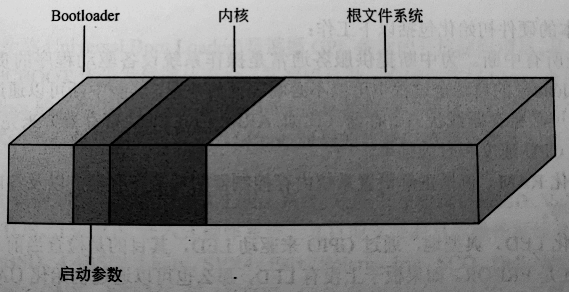
从软件的角度可将嵌入式Linux分为四个层次,四个层次由低到高分为:引导加载程序、内核、文件系统、用户应用程序(可选)。
系统存储结构图:
3.1 引导加载程序
固化在固件中(firmware)的boot代码(可选)和Bootloader两部分。如下:
代码
# EmbedSky BIOS for SKY2440/TQ2440 #####
Press Space key to Download Mode !
Booting Linux ...
Copy linux kernel from 0x00200000 to 0x30008000, size = 0x00300000 ...
Copy Kernel to SDRAM done,NOW, Booting Linux...
Uncompressing Linux..........................done, booting the kernel.
3.2 内核加载
定制的内核及控制内核引导系统的参数。如下:
代码
Linux version 2.6.30.4-EmbedSky (root@arthur-virtual-machine) (gcc version 4.3.3 (Sourcery G++ Lite 2009q1-
176) ) #1 Fri Dec 14 11:15:24 CST 2012
CPU: ARM920T [41129200] revision 0 (ARMv4T), cr=c0007177
CPU: VIVT data cache, VIVT instruction cache
Machine: TQ2440
ATAG_INITRD is deprecated; please update your bootloader.
Memory policy: ECC disabled, Data cache writeback
CPU S3C2440A (id 0x32440001)
S3C24XX Clocks, (c) 2004 Simtec Electronics
S3C244X: core 400.000 MHz, memory 100.000 MHz, peripheral 50.000 MHz
CLOCK: Slow mode (1.500 MHz), fast, MPLL on, UPLL on
Built 1 zonelists in Zone order, mobility grouping on.  Total pages: 16256
Kernel command line: noinitrd root=/dev/mtdblock2 init=/linuxrc console=ttySAC0

......

yaffs_read_super: isCheckpointed 0
VFS: Mounted root (yaffs filesystem) on device 31:2.
Freeing init memory: 240K
3.3 文件系统
实现文件存取、管理等功能的模块,提供一系列文件输入输出等文件管理功能,为嵌入式系统和设备提供文件系统支持。
代码
Start Qtopia-2.2.0
usbcore: registered new interface driver zd1211rw
usbcore: registered new interface driver rt73usb
rtusb init rt2870 --->
usbcore: registered new interface driver rt2870
Try to bring net interface up ...
ifconfig eth0 hw ether 10:23:45:67:89:ab
eth0: link down
ifconfig eth0 192.168.1.6 netmask 255.255.255.0 up
add default gw 192.168.1.2
Done
[01/Jan/1970:00:00:07 +0000] boa: server version Boa/0.94.13
[01/Jan/1970:00:00:07 +0000] boa: server built Jul 29 2009 at 14:27:34.
[01/Jan/1970:00:00:07 +0000] boa: starting server pid=643, port 80

Please press Enter to activate this console. eth0: link up, 100Mbps, full-duplex, lpa 0x4DE1
3.4 应用程序
启动开发板后,可以看到4.3寸LCD上显示的界面,有很多基于qt开发的测试应用,如下:****
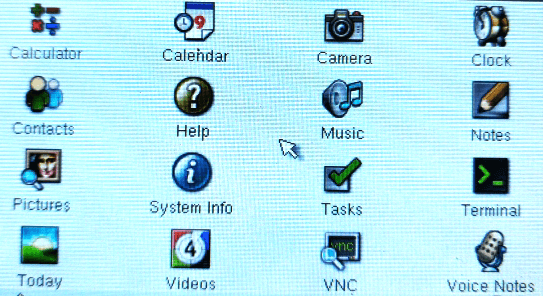
至此,启动信息结构简略介绍完成,后续会在深入linux文章中将各个再部分详细介绍。
笔者说:
对于嵌入式linux,建议循环渐进式学习,先从整体上去把控系统结构,当对整体有了“框架”式认识后,再细细学习并多实践,去充实整个框架内的内容。这样,才会不至于在学习的过程中,因为有太多的困惑而丧气甚至放弃。